



Do You Have any Questions?
Please get in touch with us via our contact form and we will respond to your questions.

Configure and manage hotel phones – directly within the familiar interface of innovaphone myApps: Made possible by the new and license-free partner app snom Hospitality. The app is designed for administrators in hotels and the entire hospitality sector.
Each supported snom Hospitality telephone model has a dedicated configuration section. This section provides access to the features and settings available for the respective device. This allows phones to be deployed efficiently and reduces the configuration effort required for administration.
Regardless of whether you have individual devices or large-scale installations, snom Hospitality simplifies the deployment and management of your phones. This saves time and reduces the effort required for configuration.
Configure and manage hotel phones – directly within the familiar interface of innovaphone myApps: Made possible by the new and license-free partner app snom Hospitality. The app is designed for administrators in hotels and the entire hospitality sector.
Each supported snom Hospitality telephone model has a dedicated configuration section. This section provides access to the features and settings available for the respective device. This allows phones to be deployed efficiently and reduces the configuration effort required for administration.
Regardless of whether you have individual devices or large-scale installations, snom Hospitality simplifies the deployment and management of your phones. This saves time and reduces the effort required for configuration.

Managing client calls, tracking call notes and organizing follow-ups can quickly overwhelm daily business operations. This often leads to teams wondering who discussed which issues.
To solve this challenge, MediaRunway launched the Call Manager. This new application integrates seamlessly into the innovaphone myApps ecosystem. The app centralizes call histories, notes, callbacks and favorites to deliver maximum clarity in daily call management.
The Call Manager enhances your experience with the Phone App by delivering practical contextual data. Teams can capture call notes, retrieve existing information and view pending callbacks directly within the active call screen.
The need to search through multiple systems for critical details is eliminated. When speaking with a client, partner or colleague, users instantly see previous conversations, open callbacks and upcoming action items.
Call Manager brings clear structure to daily communication logs. Users can view, comment on and process call entries directly, such as converting a call log into a scheduled callback.
When combined with the Analytics App, teams unlock advanced capabilities to search, filter, sort and restrict data by specific timeframes. This significantly simplifies tracking and reporting for high-volume communication teams.
Pending callbacks can be managed from a central dashboard within the Call Manager. Users can create, filter, sort and forward callbacks for individual PBX users or entire user groups. Multiple callback statuses with live updates ensure full visibility.
The built-in action history tracks every update made to a callback. This provides full transparency within the team and ensures no client request is overlooked.
In addition to call logs and callbacks, the Call Manager offers advanced options for favorite lists. Users can organize contacts into custom groups without the traditional 30-contact limitation.
Teams can search for PBX users directly, add custom destinations and use full support for federation scenarios. Integrated actions allow users to call or message contacts straight from the list.
Call Manager by MediaRunway is designed for environments where telephony drives daily business, including sales, service, support and reception desks. By bringing information, notes, callbacks and contacts directly into the conversational context, the app empowers teams to work faster and more structured.
More information on the Call Manager by MediaRunway
Successful communication across language barriers requires both fast translations and a secure processing environment.
Government agencies, public institutions, critical infrastructure providers, the healthcare sector and international teams rely heavily on these factors. For these organizations, data protection, control and digital sovereignty are essential.
The innovaphone Translations App offers even greater flexibility with Service Release V16 SR3 by supporting integration with eTranslation, the AI translation service of the European Commission, and allowing the use of a company’s own, locally hosted LLM.
By connecting the Translations App to eTranslation, organizations have access to an official AI translation service provided by the European Commission. This solution is ideal for organizations that:
Developed specifically for multilingual communication across Europe, eTranslation supports numerous European languages. The service is available free of charge for public administrations and other eligible user groups within the EU.
These features make eTranslation ideal for translating content regularly between different European languages. Typical use cases include international projects, collaboration with public authorities, as well as communication with partners, customers and institutions from other countries.
In addition to eTranslation, the Translations App can connect directly to your company’s own, locally hosted LLM (from V16r1 SR3).
This solution is ideal for organizations that prefer to process all translations within their own secure network. Instead of relying on an external translation service, companies can run an internal language model. This approach is perfect for highly sensitive data or specific internal requirements.
In addition to eTranslation, the European Commission provides various other AI-powered language tools. These include solutions for:
Using the innovaphone Software Development Kit (SDK) and the APIs provided by the EU, such services can also be integrated into the innovaphone environment. This opens up opportunities beyond simple translation to securely and effectively integrate AI-based voice features into existing workflows.
The updated Translations App offers organizations greater flexibility in how they handle translations within myApps. Companies can choose between using a European service like eTranslation, running an internal, locally hosted LLM, or connecting to additional language services in the future.
This represents a major milestone for government agencies, public institutions, critical infrastructure providers, and other organizations with strict communication requirements. It simplifies multilingual collaboration while aligning perfectly with internal data protection and infrastructure policies.

MobiApp Demo – Discover the mobile solution for alerting, location tracking, and communication. MobiApp brings alerting and communication directly to mobile devices, enabling fast and clear responses - even for lone workers and in critical situations.The MobiApp Demo is available in the innovaphone myApps portal and provides an overview of the features and possibilities of the MobiCall alarming solution “MobiApp”, powered by NewVoice International. After opening the app, users are presented with a welcome message and a start screen explaining that they can navigate through the app by swiping left or right

TIMIO. Contact Center expands innovaphone myApps with a comprehensive omnichannel solution for professional service communication. Service inquiries via phone, email, and web chat are intelligently routed and managed in a structured manner throughout the entire handling process: from capture and routing to CRM integration, context-based processing, and transparent analysis.The result is a contact center that goes far beyond traditional queues, ACD logic, or simple call distribution. 100% software made in Germany, integratable, scalable, and AI-ready.The app requires a TIMIO. Contact Center (cloud-based or on-premises).
Get more information on Timio. Contact Center

"Could you please resend the file? It was too large to send via e-mail…"
Does this sound familiar to you? Files are increasing in size: Presentations, videos and the documentation of projects quickly exceed the size limits of standard e-mails. The result: workarounds, external tools, or insecure solutions.
Share Files without Detours
Use the app to transfer large files directly through your own system - without any external platforms or additional tools. You remain in full control over where your data is stored and who is able to access it.
Security that Thinks Ahead
Every file can be encrypted, password-protected, and made available only for a limited time. This ensures that sensitive content can be accessed only by the authorized persons and only for as long as necessary.
Full Control Instead of Shadow IT
Whether in a project team, when communicating with customers or when handling sensitive documents: Instead of using insecure cloud services, use an integrated solution within your myApps environment – transparent and in compliance with GDPR.
A customer would like you to send a comprehensive presentation with multiple files. Instead of splitting it up or sending the files via external services, you can create a secure download link with a password and expiration date. This allows you to hare files quickly and securely, directly from your system.
With Voconix, companies can quickly and easily create professional, multilingual voice announcements using AI. A broad selection of natural-sounding voices and royalty-free, commercially usable music ensures a modern and high-quality presentation.
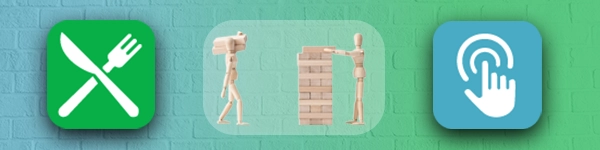
Buttons App & Lunch App: Free of charge, open, customizable
What if you could not only use your applications in myApps, but also expand them according to your own needs?
What’s best: No license fees, no black box, plenty of room for own ideas!
We would like to introduce two new innovaphone apps: Buttons and Lunch. You can use and customize these apps free of charge - including the source code. This expands our ecosystem to include a new category: License-free apps with open framework to which you can add your own functions and solutions.
Turn on the lights, open doors, start machines, or trigger external systems: Buttons brings IoT devices and external interfaces directly into your myApps interface.
Ideal for smart offices, industrial environments, or individual automation—and as a basis for your own integrations.
more details on the Buttons App
Plan your lunch, look at the menu, pre-order a meal: The Lunch App integrates the cafeteria directly into myApps. Employees can view meal plans, pre-order a meal, and organize their lunch quickly and conveniently without having to get in touch with anyone personally.
The Buttons and Lunch App do not require a license, and they are available with source code under MIT license.
You can use, customize, and expand the apps, or use them as a basis for your own developments.
In short: Build your own apps based on innovaphone.

An important contract is being discussed over the phone - weeks later, nobody remembers the exact details that had been discussed. Another situation: A meeting with a customer provides valuable insight that could be used for training input - if only there were a recording to recreate the situation.
XQv Recording by XQTING enables easy, secure and centralized recording of inbound and outbound calls. All calls are recorded automatically or manually, stored in a tamper-proof manner and made available in a modern user interface.
Advantages of XQv Recording:
Whether for quality assurance, training, traceability or regulatory obligations – XQv Recording ensures that no word is lost and everything is reliably documented.

Joined forces for a future-proof switch: effexx has placed the further development of the “Diversion” App in the experienced hands of MediaRunway. The new "Call Forward Personal" App continues to offer modern and future-proof features for the same price – including seamless migration.
Promotional offer until March 31st, 2026:
If you already use “Diversion”, you can order Call Forward Personal for free with the same number of licenses you have been using. Your current settings from “Diversion” will be transferred during installation.
Your advantages:
What to do next: Simply contact your innovaphone partner and we will take care of everything else from here.

A customer is calling because the system is down, and ends up with the right point of contact straight away. No call transfer, no waiting queue, thanks to anyContact innoACD: A call center & contact center solution that redirects incoming calls based on the skills, availability and workload of your agents.
Unlike traditional waiting queue solutions, skill-based routing ensures that every call goes directly to the person with the right expertise. This enables faster problem solving, more efficient processes, and happier customers.

In many companies, employee information is scattered across different systems: Qualifications here, Contact information there, project responsibilities somewhere entirely different. The Users Plus App by MediaRunway finally makes and end to chaos and reveals talents.
Sample scenario: You have an important new project and need a seasoned IT specialist, preferably someone who has already worked with the same customer? Users Plus will help you find the suitable specialist in no time.

Every year anew, public holidays need to be entered manually into the time switches for announcements and open business hours to be correct. This quickly turns into a time-consuming task, especially if businesses have several sites.
Holidays by MediaRunway takes care of this task. The app automatically imports public holidays - and optionally school holidays - into existing time switches of the innovaphone PBX. Data can be imported manually for each year, or fully automatically.
Benefits for your business:
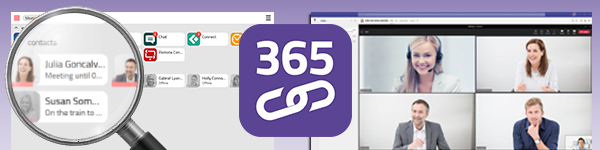
The Connector for M365 makes your business communication even smarter. The app connects Microsoft Teams with innovaphone myApps, ensuring automatic synchronization of presence and call status. All participants remain available at all times – without annoying double ringing, and without losing information.
If you use Microsoft 365 with Exchange online, you should keep in mind October 2026. On October 1st, 2026, Microsoft will discontinue the EWS protocol used to date. This means following: The Calendar App will no longer work for the calendar presence synchronization between Microsoft 365 and innovaphone myApps. The Connector for M365 provides a solution because it is based on the modern Microsoft Graph API. It and makes calendar integration and presence synchronization future-proof.
Please note: For users of Exchange on premises, the Calendar App remains the appropriate solution for synchronizing calendar presence.
An employee is participating in a Teams call. A customer is trying to call the respective innovaphone extension of this employee at the same time. Without the connector, the telephone will keep ringing and ringing, the customer may even end up in the waiting queue. With the Connector for M365, the system will automatically recognize that the extension is “busy”. The call will be forwarded in accordance with the predefined rules – the customer will receive the service, and the employee can participate in the online meeting without any interruption.
The Connector for M365 is more than just an add-on; it is the key to smooth communication between Microsoft 365 and myApps. By 2026 at the latest, it will be available to Exchange Online users who synchronize their calendar entries.
Please visit our web for more detailed information on the Connector for M365

AttendIA is a generative AI–powered voice bot that sits at the front line of customer interaction.
Once configured with your company’s own documentation (PDFs, DOCX files, Excel sheets, websites, etc.), AttendIA can instantly answer customer queries in natural language. In addition to providing context‐aware information, it can be programmed to perform intelligent actions as configured - such as transferring calls, sending emails, creating support tickets, or querying back‐end systems - so that routine tasks are handled automatically
Designed for seamless integration with your existing innovaphone PBX (via myApps platform), AttendIA elevates customer service by combining AI‐driven knowledge retrieval with intelligent action‐taking as configured.
SNcom GmbH offers “anyContact innoACD” as a standalone call/contact center solution for intelligent call processing on the innovaphone App Platform.
In contrast to the standard built-in queue-based solutions, innoACD relies on intelligent skill-based routing: incoming calls are not simply distributed in the order they arrive or via call groups, but instead based on the specific skills of available agents.This ensures an optimized service experience for the caller.

Every day, criminals try to obtain sensitive information such as passwords or bank details using fake messages. These attacks are often so perfectly disguised that it is hard to distinguish these from genuine messages. Just one wrong click can have dire consequences.
With emailOK, you can quickly and reliably check emails, text messages or WhatsApp messages for authenticity. Simply paste the message text into the window, click on “Analyze” and read the result in traffic light colors. This allows you to recognize risks and phishing attempts immediately and keep your communication secure.
Keep your digital security on track! Use emailOK to detect phishing attempts, protect your data from being stolen and minimize the risks. Usage is intuitive, and you will get results in a matter of seconds, leaving you with some peace of mind with every message.

With the Gigaset DeskPhone App, it is possible to provision Gigaset desk phones of the P-series. Additionally, the phonebook and the keys can be mirrored onto the desk phones. Furthermore, the local innovaphone directory, as well as the ability to customize and control call forwarding, groups, presence, and time recording are provided as a PBX menu.
Visit our innovaphone Wiki for more detailed information.
The Gigaset Feature Control App acts as an add-on to the Gigaset Provisioning App. It provides a PBX menu on Gigaset professional handsets, offering the ability to customize and control call forwarding, groups, presence, and time recording.

Our app partner MediaRunway has developed two new apps for our myApps portfolio. These apps are smart tools to facilitate your day-to-day work: Call Info Plus and Service24h. Both apps will be available from April 1st, 2025. These two newcomers are already listed within our innovaphone price list.
Would you like to see straight away, who is calling and what information is available about the caller? The Call Info Plus App displays caller details from the Contacts Manager App directly in your Phone App. The data can be individually integrated from systems such as CRM or ERP and visually adapted using the integrated editor (i.e. color highlighting, larger font size for particularly relevant information). You will always be well-informed, even before picking up the phone.
The Call Info App retrieves information from an LDAP server while the Call Info Plus App uses data from the Contacts Manager App. This allows for more detailed caller information to be displayed. The Contacts Manager App is therefore a prerequisite for using the Call Info Plus App.
Please visit our Wiki for more detailed information.
Ideal for support teams and emergency services: With Service24h, inbound calls are forwarded in a predefined sequence until someone answers the call. A confirmation via DTMF tone ensures that the call has really been accepted. If nobody answers the call, the sequence begins anew. This tool is ideal for critical situations where phone calls may not remain unanswered.