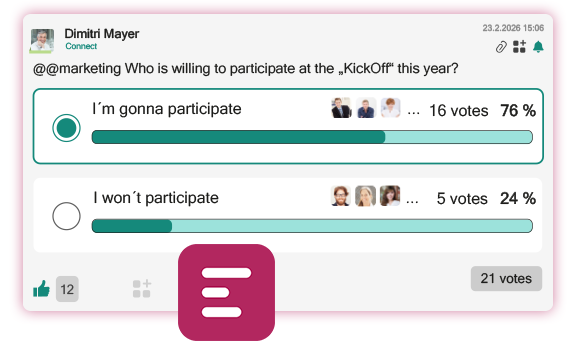
Use the Polls App to create interactive surveys, and to quickly gather feedback. Quickly launch a new poll directly in one of your posts or comments. You have flexible options, including any number of choices, single or multiple selections, anonymous voting, and an expiration date. Votes can be changed at a later point, or withdrawn. Participants further see the current results in real time. Once the poll ends, the app automatically displays the winning option, for even faster decision-making in your team.
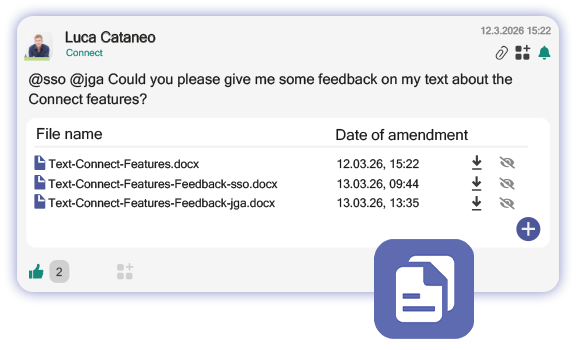
The Documents App integrates file management directly into Connect. Simply add a document repository to your post or comment. You can easily upload files there using a button or drag-and-drop, and then share these documents with all team members.
The files can be viewed and edited, changes are automatically updated. All uploaded documents are displayed in a list showing the file name, modification date and editor. This keeps all documents centrally available and directly within the relevant conversation to enable structured and transparent collaboration.
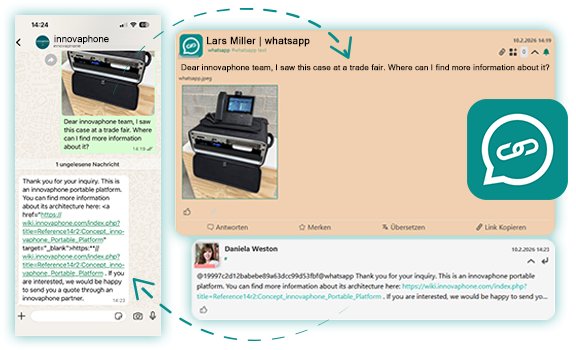
The Connector for WhatsApp enables you to use the WhatsApp Business API in Connect and bundles all conversations in the Connect App. You can receive and respond to messages and media content from WhatsApp directly in the appropriate channels in Connect, allowing you to respond to customer requests without switching apps or going through your inbox.
If you have multiple WhatsApp numbers, inquiries on different topics are routed to the corresponding channels, ensuring that the relevant staff members are notified immediately. Keep your discussions organized, and maintain a well-structured overview at all times. Respond quickly to customer inquiries to provide great customer services.
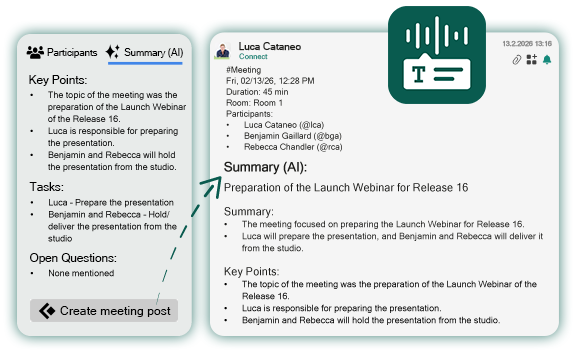
Use the new Conference Transcriptions feature to record conferences efficiently. Audio content is automatically converted to text. The content is presented neatly and can be refined using customizable prompts.
The results and to-do items are then available directly in the Connect App, where they can be edited and posted. The AI model used is up to you. Conveniently access all features for transcriptions via the participant list in the Softphone App - from initiating the transcription to posting the meeting minutes.